
API documentation is crucial for any modern web application. In this guide, I'll walk you through implementing Scalar API documentation with multi-version support in .NET 10. Scalar provides a beautiful, interactive documentation UI that's more modern and user-friendly than traditional Swagger.
💡 Key Insight
You don't need complex API versioning middleware! Scalar's multi-document feature works beautifully with just the [ApiExplorerSettings(GroupName = "vX")] attribute.
What We'll Build
✅ By the end, you'll have:
• Multi-version API (v1 and v2) with separate endpoints
• Scalar documentation with interactive UI
• Multiple OpenAPI documents (one per version)
• JWT Bearer authentication support
Prerequisites
Install the Scalar package:
<PackageReference Include="Scalar.AspNetCore" Version="1.2.65" />That's it! No API versioning packages needed.
Step 1: Create Version-Specific Controllers
The key is using [ApiExplorerSettings(GroupName = "vX")] on your controllers.
V1 Controller
[Route("api/v1/villa")]
[ApiExplorerSettings(GroupName = "v1")]
[ApiController]
public class VillaController : ControllerBase
{
    [HttpGet]
    public async Task<IActionResult> GetVillas()
    {
        var villas = await _db.Villa.ToListAsync();
        return Ok(villas);
    }
}
V2 Controller (with Pagination)
[Route("api/v2/villa")]
[ApiExplorerSettings(GroupName = "v2")]
[ApiController]
public class VillaController : ControllerBase
{
    [HttpGet]
    [Authorize]
    public async Task<IActionResult> GetVillas(
        [FromQuery] int page = 1,
        [FromQuery] int pageSize = 10)
    {
        var skip = (page - 1) * pageSize;
        var villas = await _db.Villa.Skip(skip).Take(pageSize).ToListAsync();
        return Ok(villas);
    }
}
Feature | V1 | V2 |
|---|---|---|
Pagination | ❌ Returns all | ✅ Page + PageSize |
Route | /api/v1/villa | /api/v2/villa |
Auth | ❌ Optional | ✅ Required |
Step 2: Register OpenAPI Documents
Simple - just one line per version!
builder.Services.AddOpenApi("v1");
builder.Services.AddOpenApi("v2");
✅ Why This Works
Controllers with GroupName = "v1" appear in /openapi/v1.json, v2 controllers in /openapi/v2.json. No complex middleware!
Step 3: Configure Scalar UI
var app = builder.Build();

app.MapOpenApi();

app.MapScalarApiReference(option =>
{
    option.Title = "Royal Villa API";

    option
        .AddDocument("v1", "API Version 1.0", "/openapi/v1.json", isDefault: true)
        .AddDocument("v2", "API Version 2.0", "/openapi/v2.json");
});
💡 What's Happening?
MapOpenApi()exposes the JSON endpointsMapScalarApiReference()configures the UIAddDocument()adds each version to dropdown
Step 4: Controller Attributes Explained
The Magic: ApiExplorerSettings
[ApiExplorerSettings(GroupName = "v1")]This is the most important attribute for Scalar's multi-document feature! It tells the OpenAPI generator:
• "This controller belongs to the v1 document"
• Only include these endpoints in /openapi/v1.json
Example:
// V1 Controller - appears ONLY in v1 document
namespace RoyalVilla_API.Controllers.v1
{
    [Route("api/v1/villa")]
    [ApiExplorerSettings(GroupName = "v1")]  // ?? Key attribute!
    [ApiController]
    public class VillaController : ControllerBase
    {
        [HttpGet]
        public async Task<IActionResult> GetVillas()
        {
            var villas = await _db.Villa.ToListAsync();
            return Ok(villas);
        }
    }
}

// V2 Controller - appears ONLY in v2 document
namespace RoyalVilla_API.Controllers.v2
{
    [Route("api/v2/villa")]
    [ApiExplorerSettings(GroupName = "v2")]  // ?? Different group!
    [ApiController]
    public class VillaController : ControllerBase
    {
        [HttpGet]
        [Authorize]
        public async Task<IActionResult> GetVillas(
            [FromQuery] int page = 1,
            [FromQuery] int pageSize = 10)
        {
            // Pagination logic
            return Ok(villas);
        }
    }
}
Route Templates
// V1 - Explicit version in route
[Route("api/v1/villa")]

// V2 - Also explicit (we keep it simple!)
[Route("api/v2/villa")]
Both use explicit versioning in the route. This is the simplest and most readable approach.
💡 Pro Tip
You can use dynamic versioning like [Route("api/v{version:apiVersion}/villa")] if you set up API versioning middleware, but it's not required for Scalar's multi-document feature!
Step 5: Testing the API Documentation
Access Your Documentation
1. Start your application
2. Navigate to:
https://localhost:7297/scalar
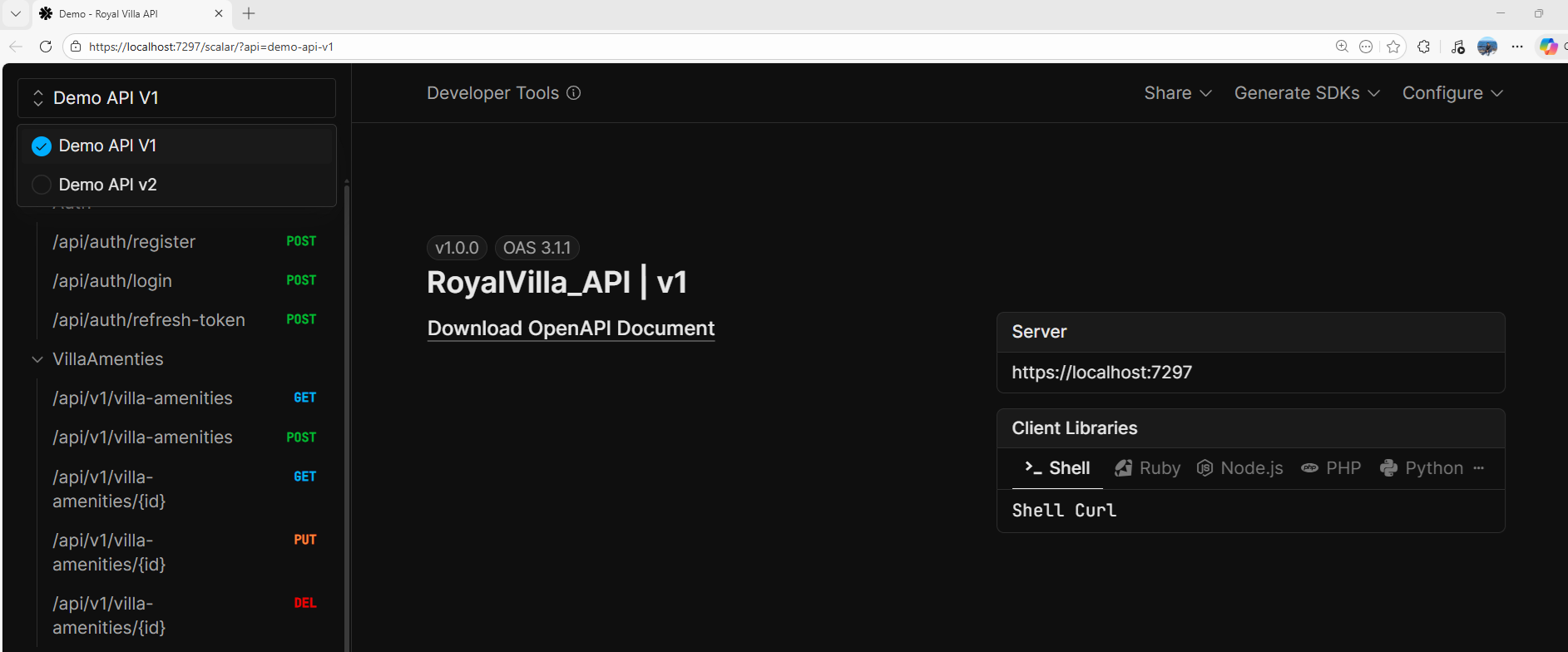
Version Switching
Click the version dropdown in the top-right to switch between:
• API Version 1.0 - Simple CRUD operations
• API Version 2.0 - Paginated results with authentication
💡 Production Considerations
While our tutorial focuses on simplicity to teach the core concepts, here are some professional improvements you might consider for production:
1. Generic Response Model
Our examples use simple IActionResult with direct returns:
[HttpGet]
public async Task<IActionResult> GetVillas()
{
    var villas = await _db.Villa.ToListAsync();
    return Ok(villas);  // ✅ Simple, but no standardization
}
For production, consider a generic response wrapper for consistency:
public class ApiResponse<T>
{
    public bool Success { get; set; }
    public int StatusCode { get; set; }
    public string Message { get; set; }
    public T? Data { get; set; }
    public string? Errors { get; set; }
}

[HttpGet]
public async Task<ActionResult<ApiResponse<IEnumerable<VillaDTO>>>> GetVillas()
{
    var villas = await _db.Villa.ToListAsync();
    var response = ApiResponse<IEnumerable<VillaDTO>>.Ok(villas, "Villas retrieved successfully");
    return Ok(response);  // ✅ Standardized response format
}
✅ Benefits:
• Consistent API responses across all endpoints
• Easier client-side error handling
• Better documentation in Scalar
• Standardized success/error messaging
🚀 Best Practices
1. Versioning Strategy
For Scalar multi-document, we use:
URL Versioning with GroupName: /api/v1/villa + [ApiExplorerSettings(GroupName = "v1")] ✅
Simple, explicit, and works perfectly with Scalar.
Alternative approaches (if you need full API versioning middleware):
• Dynamic Route with ApiVersion:
[Route("api/v{version:apiVersion}/villa")]+[ApiVersion("1.0")]• Header Versioning:
api-version: 1.0header• Query String:
/api/villa?version=1.0
All of these require API versioning middleware, which we've intentionally avoided for simplicity!
2. Controller Organization
Keep versions in separate namespaces:
Controllers/
+-- v1/
¦   +-- VillaController.cs
¦   +-- VillaAmenitiesController.cs
+-- v2/
¦   +-- VillaController.cs
¦   +-- VillaAmenitiesController.cs
Each controller has [ApiExplorerSettings(GroupName = "vX")] - that's the key!
3. Backward Compatibility
• Never break v1 - Keep it stable
• Add features in v2 - Don't remove v1 functionality
• Deprecate gracefully - Give users time to migrate
🎬 Conclusion
We've successfully implemented a professional-grade API documentation system using Scalar with multi-version support. The best part? It's incredibly simple!
⚡ Quick Recap:
Add
AddOpenApi("vX")for each versionUse
[ApiExplorerSettings(GroupName = "vX")]on controllersConfigure Scalar with
AddDocument()for each versionNo complex versioning middleware needed!
Beautiful UI with interactive testing
Now go build some amazing APIs with beautiful documentation!